The repository has 200 commits since the last release. The changelog is three months stale. Nobody wants to read git log to write it. Connecting GitHub is the easy part. The hard part is not reaching GitHub from Cowork; it is giving Cowork a range, a grouping rule, and a definition of “user-facing” before it writes a single line.
TL;DR
Connect GitHub once through Customize → Connectors with the Composio MCP URL.
Always name a tag range such as v2.3.0..HEAD; never say “recent commits.”
Conventional Commits (feat:, fix:, chore:, docs:) are the cleanest grouping rule.
Explicitly exclude merge commits, version bumps, and dependency updates.
Output one entry per merged PR, grouped into Features, Fixes, Documentation, Internal.
Keep the connection read-only unless you intentionally need to post a draft.
The connector gives hands; the pipeline gives the brief.
Connect GitHub to Cowork — the five-minute setup
The connector is account-level. Once authorized, the same connection works in Claude Web, Desktop, and Cowork; you do not repeat the OAuth flow on each surface.
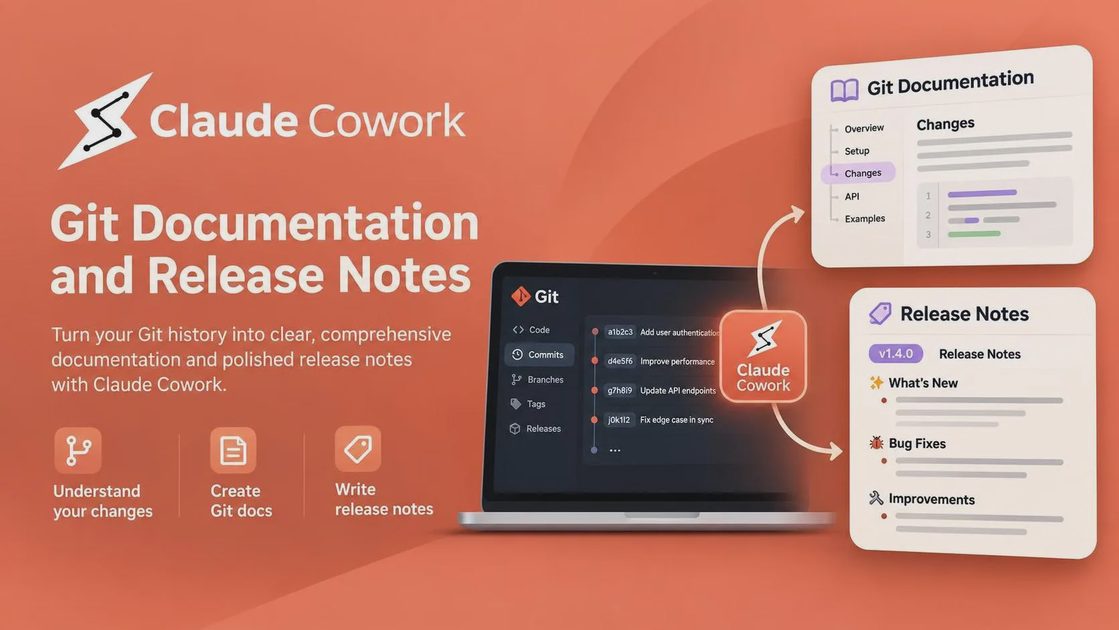
Open Customize → Connectors → +, choose Add custom connector, paste https://connect.composio.dev/mcp, and click Add.
Click Connect, complete the browser OAuth flow for GitHub, and approve the requested scope.
Trigger the first request by asking Cowork to list the latest tags or recent pull requests in a specific repository.
The connector is provided by Composio; the GitHub account itself is authorized in a second step when Claude first needs it.
The pipeline: from commits to release notes
Define the range
Never ask for “recent commits.” Name the exact range. The cleanest form is everything since a release tag up to HEAD, or every merged pull request since the last release date. The prompt must include both the tag (or date) and the branch.
A release-notes prompt without a range is a summary of whatever the model happened to retrieve — not a changelog.
Using the connected GitHub repository, list every merged pull request and commit reachable by v2.3.0..HEAD on the main branch.
Do not include anything before the tag v2.3.0.
Return the raw list first so I can confirm the range before you write notes.
Group by type, not by file
If the repository follows Conventional Commits, map the prefixes directly: feat: → Features, fix: → Fixes, docs: → Documentation, chore: and similar → Internal. If the repository has no convention, tell Cowork to group by changed area (auth, billing, API, UI) instead of producing a flat list. A flat list of commits is not documentation; a grouped list is.
Group the items in range v2.3.0..HEAD by Conventional Commit type:
- feat: → Features
- fix: → Fixes
- docs: → Documentation
- chore:, ci:, test:, build: → Internal

If a commit message does not match a prefix, place it in Internal and note that it was untyped.
One entry per merged PR, not per commit. Include the PR number and URL.
Filter the noise
Release notes that contain merge commits, version bumps, and dependency updates are not useful to the people who read them. The exclusion list must be explicit.
Internal refactors are not release notes — if the reader cannot act on it, it does not belong in the customer-facing section.
From the grouped list, remove:
- merge commits
- version-bump commits
- dependency updates (package.json, lockfiles, Dependabot)
- anything under test/ or ci/

Keep the removed items only in the Internal section, clearly marked as excluded from the customer-facing notes.
What the output should look like
The usable artifact is a short Markdown document with four sections and one line per merged PR. The Internal section exists so you can publish the other three without further editing. If almost everything lands in Internal, the release may not need customer-facing notes at all.
## Features
- Add bulk export for invoices (#482)
- Support custom fiscal-year start dates (#471)

## Fixes
- Correct tax calculation for multi-currency refunds (#479)
- Prevent duplicate webhook delivery on retry (#475)

## Documentation
- Document new export API endpoints (#480)

## Internal
- Bump linter rules (excluded)
- Refactor invoice service for readability (excluded)
The comparison below shows what Cowork needs from you for common documentation tasks and what it still cannot decide on its own.
Task | What Cowork needs from you | What it returns | What it cannot decide |
|---|---|---|---|
Summarize the last release’s commits | Exact tag or date range | Flat or grouped list | Whether a change is user-facing |
Write a changelog since v2.3.0 | Tag range + grouping rule + exclusion list | Four-section Markdown | Which Internal items to promote |
Draft a migration note from the diff | Range + the files or PRs that matter | Draft paragraphs with links | Breaking-change severity |
Update the README from recent PRs | Range + the sections of the README to touch | Proposed README diff | Tone and product positioning |
What I ran into when I asked Cowork to write release notes for a repo it had never seen
I pointed Cowork at a repository that had 180 commits since the last tag. This is one repository on one account, not a benchmark. The first run, with a vague “summarize recent commits” prompt, produced a flat list that included merge commits and a dependency bump. The second run used an explicit range, Conventional Commit grouping, and an exclusion list; it produced a four-section draft in which the Internal section held roughly 60% of the entries. The Features section needed one manual fix because a commit message said only “improve performance” without naming the component.
Run | Prompt used | What it produced | What needed fixing |
|---|---|---|---|
1 | “Summarize recent commits” | Flat list with merges and bumps | Almost everything |
2 | Range + grouping, no exclusions | Grouped but noisy | Still contained dependency noise |
3 | Range + grouping + exclusion list | Clean four-section draft | One vague “performance” entry |
4 | Same + “name the component” rule | Publishable Features/Fixes | Minor wording only |
The improvement came from the brief, not from a different model.
The write-action boundary
The connector can create issues, comment on pull requests, and invite collaborators. Those are write actions. For documentation work, most of what Cowork needs is read-only: read commits, read PR metadata, read file contents.
Scope the connection to read access unless you explicitly need to post a draft.
Require approval before any comment or issue creation.
Never connect a personal token with repo admin scope to a documentation task.
A documentation workflow needs read access and a place to write the draft — it does not need permission to merge.
When it does not work — the four cases from the connector guide
Connector shows connected but Cowork ignores it → open the + menu in the chat, hover Connectors, and turn the connector on for that conversation.
MCP server error before GitHub connects → re-check the URL is exactly https://connect.composio.dev/mcp. The connector runs from Anthropic’s cloud, so the local network is rarely the cause.
Authorization link expired → ask Cowork to retry the GitHub connection; it generates a fresh link.
Actions that worked before now fail → the OAuth token may have expired or lost scope. Ask Cowork to inspect the connection, disconnect, and reconnect.
When to skip the connector and use a local clone instead
The repository is private and the OAuth scope feels too broad for a documentation task.
The task requires reading files across many directories and the connector’s tool calls are slower than a local git log.
The release notes need to be generated offline.
The connector is for convenience, not the only path. A local clone plus git log --oneline v2.3.0..HEAD gives Cowork the same raw material without an OAuth grant.
Final Thoughts
Connecting GitHub takes minutes. Producing notes a human can publish takes a range, a grouping rule, and a noise filter. Give Cowork those three things, keep write permissions off until you need them, and treat the Internal section as the place where the agent is allowed to be noisy. Before you publish any generated notes, ask three questions: What can it do in this situation? What can go wrong if the range or the exclusion list is wrong? What should a human still review before the notes go to customers?
FAQ
Do I need a paid plan?
Yes. Cowork and custom connectors require a paid Claude plan. Free does not include the surfaces needed for this workflow.
Why does Cowork ignore the GitHub connector in a new chat?
The connector can be account-level connected yet still off for a given conversation. Open the + menu, hover Connectors, and enable it for that chat.
Can Cowork push the release notes to GitHub?
It can create a file or open a pull request if you grant write scope and approve the action. For most documentation work, generating a local Markdown draft is safer and sufficient.
What commit convention does this workflow assume?
Conventional Commits (feat:, fix:, docs:, chore:) produce the cleanest grouping. If the repository does not use them, tell Cowork to group by changed area instead and expect more manual cleanup.
Why did the first run include merge commits?
The prompt did not contain an exclusion list. Without an explicit “exclude merge commits, version bumps, and dependency updates,” those items appear in the output.
Can I use a personal access token instead of OAuth?
Some MCP setups accept a token when dynamic client registration fails. Prefer the OAuth path when it works; if you fall back to a token, give it the narrowest scope that still allows reading commits and pull requests.
For AI tool features, usage rules and available plans, refer to their official sites.
Leave your thoughts here, too.