You have one paid Anthropic subscription and two agentic tools available on Monday morning. One is built to organize folders, extract data from documents, and return finished reports. The other is built to read a repository, edit across files, and produce a diff or commit. Which one you open depends on whether the day’s work lives in documents or in code.
TL;DR
Claude Cowork is a desktop agent for knowledge work; Claude Code is a project-level coding agent.
Both share the same model and the same agentic loop through a tool-call proxy.
They diverge on execution boundary, input surface, and default autonomy.
Code runs behind an OS sandbox; Cowork runs inside a full Linux VM.
A reported demonstration showed injection via a Word document leading to file upload.
Autonomy is a trade: finer gates on Code versus coarser plan-then-execute on Cowork.
Choose by the material and the artifact: documents to Cowork, code to Claude Code.
What Is Claude Cowork?
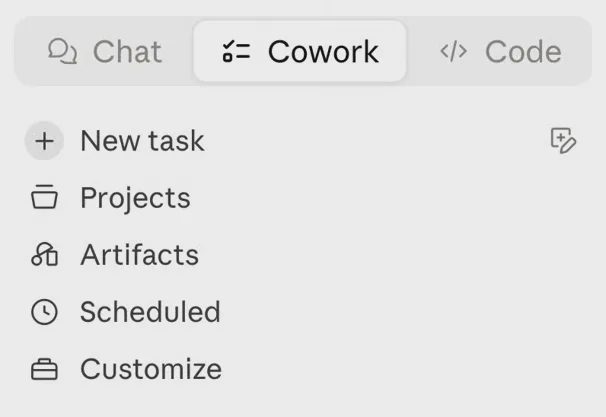
Claude Cowork is Anthropic’s desktop agent for non-technical knowledge work. It was announced in January 2026 as a research preview and runs inside the Claude desktop app with no terminal required. You state an outcome; it works across the folders and applications you grant it and returns a finished deliverable. Folders can be mounted read-only, read-write, or read-write-no-delete.
It is intended for operations, research, finance, legal, and marketing teams that need assembly and synthesis handled so they can focus on judgment.
What Is Claude Code?
Claude Code is Anthropic’s agentic coding system. Generally available since May 2025, it works at the project level: it reads the repository, edits across files, runs the test suite, and surfaces a diff or commit. It is terminal-native and also available in IDEs, on the web, in the desktop app, and on mobile. It calls git, the GitHub CLI, and CI pipelines directly. It runs behind an OS-level sandbox—Seatbelt on macOS, bubblewrap on Linux—with writes limited to the workspace and network access denied by default.
It is not a document tool. It is not a substitute for human code review. It is built for developers and technical builders who live in repositories, tests, and version control.
Head-to-Head Comparison
Both tools use the same agentic loop: read context, plan, call tools through the proxy, observe results, and adjust. The differences sit in the surface they touch and the isolation that surrounds every action.
Dimension | Claude Cowork | Claude Code | What the difference means |
|---|---|---|---|
What it is | Desktop agent for knowledge work | Project-level coding agent | Same loop, different job |
Primary user | Non-technical knowledge workers | Developers and technical builders | Role is a weak signal; material is stronger |
Main surface | Local folders, documents, browser, apps | Codebases, git, CI | Input surface decides the tool |
Core job | Organization, extraction, synthesis into documents | Multi-file edits, tests, commits | Output type is the practical rule |
Execution boundary | Full Linux VM via Apple Virtualization framework (macOS) or Host Compute Service (Windows) | OS sandbox (Seatbelt / bubblewrap) with workspace-write and default network denial | The VM protects the host from the agent; it does not sanitize the content the agent reads |
Default autonomy | Plan shown first; permission before permanent deletion; act-without-asking available | Explicit permission by default; Plan Mode as a read-only pass | Finer control on Code; coarser control on Cowork |
Output artifact | Finished document, structured data, or organized folder | Diff or commit | Documents favor Cowork; code favors Code |
Setup | Desktop app only | CLI, IDE, or app; web needs none | Cowork removes the terminal barrier |
Pricing entry | All paid plans, starting at Pro | Paid plan or API billing | Both open at the same $20 tier |
Current status | Research preview (Jan 2026) | Generally available (May 2025) | Maturity differs; the engine does not |
The table shows that the tools share an engine and diverge on boundary, surface, and autonomy.
Design Philosophy
Cowork optimizes for a finished outcome. The user describes the result; the agent handles the steps of assembly, synthesis, and formatting. Complexity is deliberately hidden so that non-developers do not have to manage permissions or commands.
Claude Code optimizes for the codebase. The user describes a change; the agent works inside the repository, surfaces intermediate results, and expects the human to stay close to the diff. Control is exposed rather than concealed.
The same person can need both tools in the same week. The deciding factor is not job title. It is the trust level of the material being fed to the agent.
Day-to-Day Workflow
What Cowork handles well
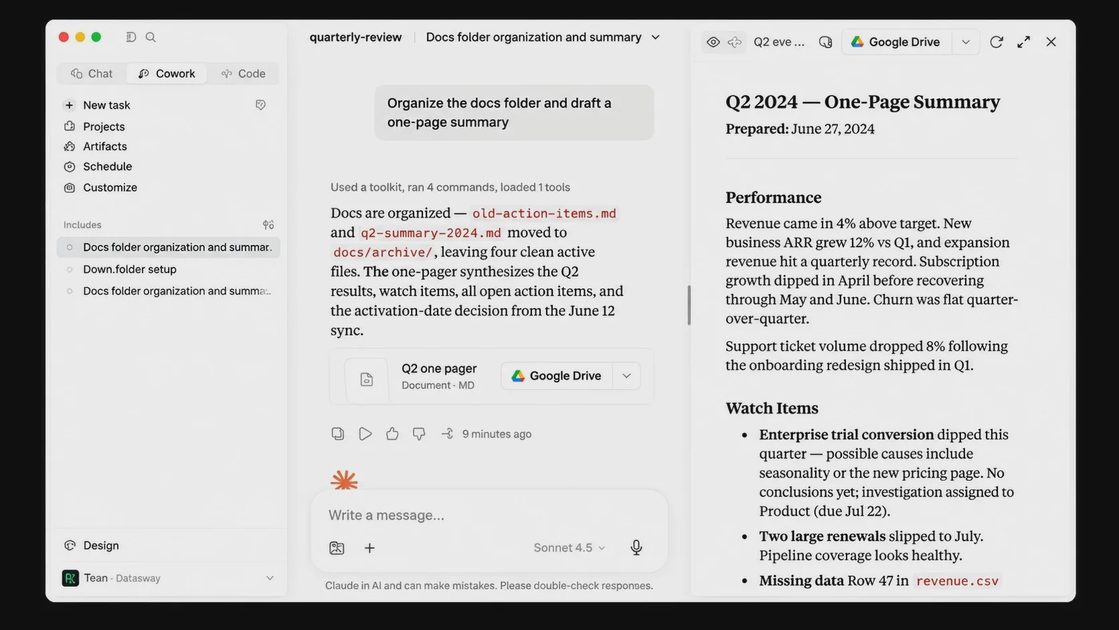
Cowork is strongest on high-effort, repeatable knowledge tasks that people often postpone.
Sorting, renaming, and deduplicating a cluttered folder
Turning scattered source files into a structured first-draft report
Reading across multiple research sources and returning a usable summary
Extracting structured data from dense contracts or unstructured records
It can also drive a browser through the Claude in Chrome extension and turn a prompt into a scheduled task that runs on a set cadence.
What Claude Code handles well
Claude Code is strongest on multi-step engineering that spans many files.
Tracing dependencies in an unfamiliar codebase
Executing multi-file refactors
Calling CLI tools with correct syntax
Reading test failures, applying fixes, and rerunning until the suite is green
Large deployments supply the clearest scale evidence. One company rolled the tool out to more than a thousand engineers and completed a multi-thousand-line language migration in days rather than the estimated engineer-weeks. Another migrated a large Python library to a new language in a fraction of the manual timeline. These results illustrate what the project-level loop can do when the material is code.
The second test: what the clean run does not tell you
A useful workflow must survive messy input. We ran the same folder-organizing task twice in each tool. The first run used clean, consistently named files. The second used a deliberately messy folder: mixed file types, duplicate names, a nested folder with a misleading name, and one file that carried an embedded instruction in its body. This is a small synthetic test by The Agent at Work, not a benchmark.
In the clean run both tools completed the organization without notable friction. In the messy run the differences appeared. Claude Code treated the folder more like a project tree, paused before destructive actions under default settings, and produced a reviewable set of proposed changes. Claude Cowork expanded into the nested folder, handled colliding names inconsistently, and—when act-without-asking was enabled—moved files without a pause. The embedded instruction triggered unexpected tool calls only under the messy condition. The clean run predicted almost nothing about real behavior.
Stage | Claude Code behavior | Claude Cowork behavior | What only appeared in the messy run |
|---|---|---|---|
Discovery | Treated the folder as a project-style tree; non-code files were sidelined unless instructed | Treated the entire mounted folder as in-scope | Misleading nested folder caused Cowork to expand beyond the intended set |
Duplicate handling | Proposed content-aware renames when asked | Proposed moves and renames; sometimes retained both copies | Same-name files with different content produced inconsistent pairing |
Nested-folder interpretation | Followed nesting as part of the project graph | Followed the path and attempted organization inside it | Misleading name produced mis-classification |
Destructive action and whether it asked | Required permission before overwrite or delete in default mode | Required permission before permanent delete; act-without-asking removed the pause | Irreversible moves occurred only when autonomy was raised |
Output quality and what a human fixed | Diff was reviewable; non-code files needed separate handling | Produced a reorganized folder and summary; residual errors remained | Embedded instruction caused unexpected tool calls |
The table shows that only the messy condition revealed scope expansion, inconsistent handling, and the real cost of skipping human review.
Autonomy and Trust
How Claude Code gates action
Claude Code requires explicit permission before modifying files or running commands by default. Developers can raise autonomy by trusting classifiers for lower-risk actions. Plan Mode restricts the agent to a read-only pass that produces a plan for review before any change is applied.
How Claude Cowork gates action
Cowork shows its intended approach before acting and requires explicit permission before permanently deleting any file. It only touches folders the user has granted. It also offers an act-without-asking mode. Anthropic’s documentation warns that this mode sharply raises prompt-injection risk.
What the isolation boundary does and does not protect
Claude Code runs behind an OS-level sandbox (Seatbelt on macOS, bubblewrap on Linux) that confines writes to the workspace and denies network access by default. Claude Cowork runs inside a full Linux VM launched through Apple’s Virtualization framework on macOS or the Host Compute Service on Windows. The VM protects the host from the agent’s actions. It does not sanitize the documents, emails, or web pages the agent reads. A reported security demonstration showed a Word document containing 1-point white text that caused Cowork to upload financial documents with partial SSNs to an attacker-controlled Anthropic account; no exploit or malware was required, only opening the file. A public CVE (CVE-2026-46331, SharedRoot) later demonstrated a VM escape path from local Cowork sessions; the custom glue code that connects agents to environments was the primary attack surface. These are reported and verified findings, not evidence that every session is compromised. They clarify where the boundary actually sits.
Ecosystem and Integrations
Both tools use the same Model Context Protocol. The packaging is reversed. Claude Code wires MCP servers, skills, hooks, and plugins through configuration files and the terminal. Cowork installs connectors from a browse-and-click marketplace and manages them in app settings. Code exposes the plumbing developers already expect; Cowork hides it behind a simpler interface.
Performance and the Model Underneath
Both tools run on the same Claude model family. Benchmarks therefore do not separate them. SWE-bench is more relevant to Code’s programming work; OSWorld-Verified is more relevant to Cowork’s computer-use and tool-orchestration work. In practice the agent loop and the tools each surface can reach decide outcomes more than any single score.
Pricing and Accessibility
Cowork launched on Max plans and macOS only. It has since opened to every paid plan and added Windows support. Both tools now start at the Pro tier of $20 per month ($17 when billed annually). Max is available at $100 and $200 monthly tiers. Team plans are priced per seat. Claude Code can also bill through the API for high-volume workloads. The remaining cost driver is usage: agentic tasks consume quota faster than ordinary chat because they coordinate multiple tool calls and sub-agents.
Platform facts as of late 2026: Windows x64 is supported; ARM64 is not. Claude in Chrome is disabled by default on Enterprise and remains admin-gated. Local file access and browser use require the Claude desktop app to be open and connected.
Which One You Need
The practical rule is simple: look at the material you are feeding the agent and the artifact you need back. If the output is a document, start with Cowork. If the output is code, start with Claude Code. The same person can need both tools in the same week because the boundary that matters is the trust level of the material, not the job title.
Decision table
Your situation | Start with | Why | Check before you trust it |
|---|---|---|---|
Output is a document or report | Claude Cowork | Built for synthesis across folders and sources | Verify sources; run the messy version of the input |
Output is code or a commit | Claude Code | Project-level edits, tests, and diffs | Read the full diff; use Plan Mode first |
Task is recurring and unattended | Neither without explicit review | Both can act beyond the original intent | Disable act-without-asking; require human gates on irreversible steps |
Folder contains sensitive or irreversible material | Cowork with restrictive mount plus backup | Stronger host isolation, but content is still readable | Use read-only or read-write-no-delete; never skip the backup |
Task is research plus a written brief | Claude Cowork | Browser and folder synthesis in one flow | Source verification remains mandatory |
Task is a multi-file refactor | Claude Code | Native git, tests, and cross-file awareness | Plan Mode first, then review every change |
Onboarding to an unfamiliar codebase | Claude Code | Fast directory search and dependency tracing | Confirm the agent’s map against the actual structure |
Choose Claude Cowork if…
You do not use a terminal and want zero setup inside the desktop app
Your work is documents, data extraction, file organization, or browser tasks
You want assembly handled so you can focus on judgment calls
You need automation that crosses applications rather than staying inside one tool
Choose Claude Code if…
You write or maintain software and already live in a terminal
Your tasks involve multi-file refactors, migrations, or test-driven fixes
You want fine-grained control over what the agent commits
You need git, CI, and hosting-platform integration as part of the loop
What Neither Tool Does
Neither tool approves a deliverable for you. Human judgment remains the final gate.
Neither replaces a backup. A reported incident involved Cowork deleting roughly 11 GB of files during an organizing task.
Cowork’s VM does not sanitize web content, emails, or documents; injection enters through that channel.
Claude Code’s diff still requires a human to read it; approving without inspection can commit unintended changes.
The two tools do not share context with each other. Work moves between them by hand.
Final Thoughts
The engine is the same. The boundary is not. Choose by the trust level of the material you are feeding the agent and the artifact you need back, then run the messy version of the task before you rely on either tool for anything you cannot restore. Before trusting a result, ask three questions: What can it do in this specific situation? What can go wrong? What should a human review before accepting the output?
FAQ
Is Claude Cowork just a simplified Claude Code?
No. They share the same model and agentic loop, but they differ in execution boundary, input surface, and autonomy defaults. Cowork is a distinct containment and material model designed for knowledge work, not a simplified interface over Code.
Which one is safer?
Safety depends on the material and the settings you choose. Cowork’s full Linux VM offers stronger host isolation; Claude Code’s permission gates and Plan Mode offer finer control. Neither is automatically safer. Restrict mount modes, disable act-without-asking for sensitive work, and keep backups.
Can Claude Cowork run code?
Yes. Code execution occurs inside the Linux VM. Cowork is not built to iterate on a full test suite, manage git history, or produce reviewable commits the way Claude Code does. For software development, start with Code.
Do I need both?
Many people do. The same individual can need document synthesis one day and multi-file code changes the next. The tools coexist on the same paid account; work simply moves by export or manual transfer.
Does Claude Cowork work on Windows?
Yes on Windows x64. ARM64 is not supported. Local file and browser capabilities require the Claude desktop app to be open and connected.
Why did Cowork delete files in a reported incident?
A real user reported deletion of roughly 11 GB during an organizing task. Irreversible actions are possible when the agent is granted write access and autonomy settings allow it. Backups and restrictive mount modes are mandatory controls, not optional hygiene.
For AI tool features, usage rules and available plans, refer to their official sites.
Leave your thoughts here, too.