Enterprise buyers evaluating AI coworkers in late 2026 face two products that launched in the same window and target the same knowledge workers. Both can organize files, draft deliverables, and run multi-step tasks. They sit in different places in the stack. Claude Cowork is a standalone desktop agent; Copilot Cowork is an orchestration layer inside Microsoft 365. The choice is less about model quality and more about deployment model, audit visibility, licensing shape, and how tightly the agent must live inside an existing Microsoft estate.
TL;DR
Claude Cowork is a standalone desktop agent with local file access; Copilot Cowork is a tenant-bound agent inside Microsoft 365.
Cowork runs on the endpoint; Copilot runs in the cloud and requires files in OneDrive or SharePoint.
Cowork supports MCP connectors; Copilot Cowork does not yet expose MCP support.
Cowork activity is not captured by Audit Logs or the Compliance API in the same way Microsoft records tenant actions.
Cowork is one line item starting at $20 Pro; Copilot is a $30 add-on on top of a qualifying M365 plan.
Copilot inherits Microsoft’s full compliance envelope; Cowork relies on org-level Anthropic certifications plus controls the buyer must assemble.
Choose by constraint: M365-standardized and regulated teams lean Copilot; hybrid stacks and local-file needs lean Cowork.
What Is Claude Cowork?
What it is
Claude Cowork is Anthropic’s standalone desktop agent for knowledge work. Launched in January 2026 as a research preview and generally available on all paid plans by mid-2026, it runs inside the Claude desktop app on macOS and Windows. Users grant folder access; the agent works across local files, connected apps, and browser sessions, then returns a finished deliverable. Folders can be mounted read-only, read-write, or read-write-no-delete. The interaction model is delegation: state the outcome, review the plan, approve or correct as needed.
What it is not
It is not an Microsoft 365 add-on. It is not a cloud orchestrator that keeps running when the user’s machine is off. It is not covered as an Eligible Service under Anthropic’s BAA in standard configurations, and its sessions are not covered by zero data retention. There is no Cowork-specific SOC 2; Anthropic holds organization-level certifications.
Who it is for
It fits smaller teams, hybrid tool stacks, and individual contributors who need direct local-file access without first migrating content into OneDrive or SharePoint. It also fits organizations that prefer a single predictable seat price over layered Microsoft licensing.
What Is Copilot Cowork?
What it is
Copilot Cowork is Microsoft’s autonomous agent layer inside Microsoft 365 Copilot and Copilot Studio. Generally available for M365 Copilot tenants by mid-2026, it operates across Word, Excel, Teams, Outlook, SharePoint, OneDrive, and Dynamics 365. It uses Microsoft Graph for context, Copilot Studio for custom agent design, and Azure infrastructure for execution. Scheduled tasks continue even when the user’s machine is powered off.
What it is not
It is not a standalone product. It cannot be purchased or used without a qualifying Microsoft 365 base plan plus the Copilot license. It does not yet support MCP connectors, which limits reach into non-Microsoft tools without additional bridging.
Who it is for
It fits organizations already standardized on Microsoft 365, especially those in regulated industries that need the Microsoft compliance envelope, central audit trails, and tenant-level administration.
Head-to-Head Comparison
The products differ most clearly in where they run, what they can see, and what an administrator can later reconstruct.
Dimension | Claude Cowork | Copilot Cowork | What the difference means |
|---|---|---|---|
What it is | Standalone desktop agent | Tenant-bound agent inside M365 | Local endpoint vs. cloud orchestration |
Deployment model | Local desktop app | Cloud (Azure) | Machine-on requirement vs. always-available |
Primary surface | Local folders, desktop apps, browser | Word, Excel, Teams, Outlook, SharePoint, OneDrive | Endpoint flexibility vs. suite depth |
File access | Local filesystem (mount modes: read-only / read-write / read-write-no-delete) | OneDrive / SharePoint | No migration step vs. files must live in the tenant |
M365 integration | None native | Deep (Graph, Power Automate, Copilot Studio) | Export/import or connectors vs. native |
MCP support | Yes | Not yet | Cross-tool reach vs. Microsoft-centric reach |
Audit-trail coverage | OpenTelemetry + limited Compliance API; activity not fully in Audit Logs | Native tenant audit logging | Buyer must assemble the trail vs. inherited trail |
Compliance envelope | Anthropic org-level SOC 2 / ISO 27001; no Cowork-specific SOC 2; not BAA Eligible in standard configs | SOC 2, ISO 27001, GDPR/CCPA, HIPAA-eligible, HITRUST, data residency | Certifications exist, but agent actions may not appear in the log the buyer needs |
Licensing shape | Single seat: Pro $20 ($17 annual), Max, Team, Enterprise | $30/user/month add-on on top of qualifying M365 plan | One line item vs. layered cost |
Setup complexity | Install and grant folders | M365 admin configuration + agent setup | Minutes vs. tenant-level work |
The table shows that the practical gap is not intelligence; it is location, visibility, and procurement motion.
Enterprise Architecture: Desktop Agent vs. Tenant-Bound Orchestrator
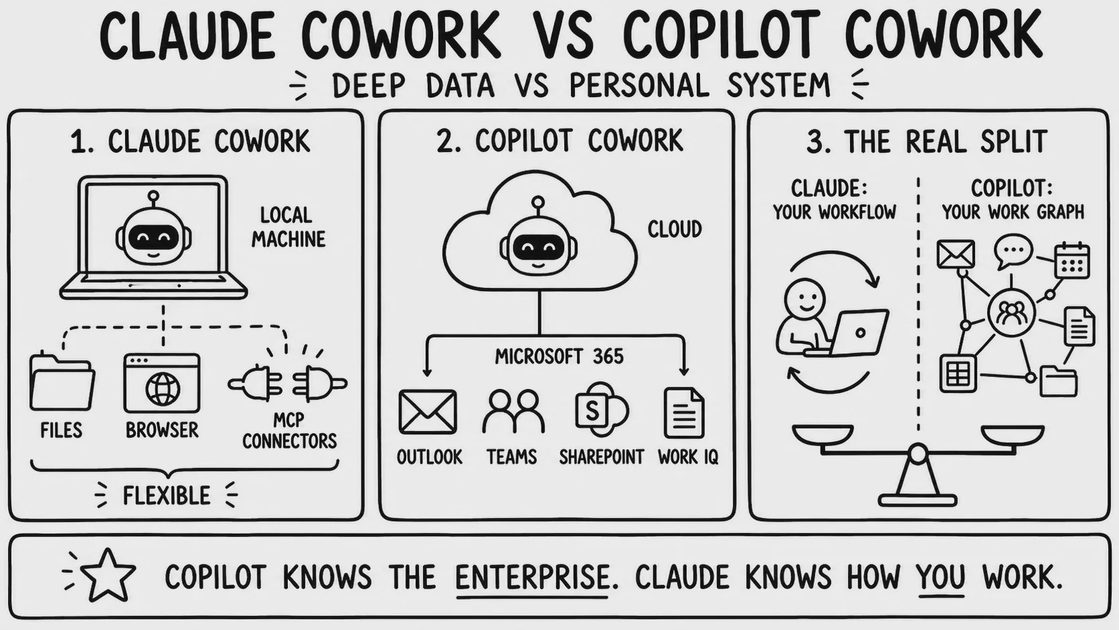
Claude Cowork on the endpoint
Each employee runs the desktop app independently. There is no central administration of the actions the agent takes on that machine. Enterprise controls exist—role-based access, group spend limits, OpenTelemetry export for SIEM pipelines, and usage analytics—but they sit alongside the Microsoft estate rather than inside it. A shared user identifier can help correlate OpenTelemetry events with Compliance API records, yet the computer-use path still requires separate policy.
Copilot Cowork inside the tenant
Copilot Cowork executes inside the Microsoft tenant. Files must already live in OneDrive or SharePoint. Scheduled tasks continue after the user’s laptop is closed. Administrators inherit the tenant’s policy surface, audit logging, and residency controls. Cowork gives the agent your local filesystem; Copilot gives the agent your tenant — and asks you to move the files first.
Dimension | Claude Cowork | Copilot Cowork | Operational consequence |
|---|---|---|---|
Where execution happens | Local desktop | Cloud tenant | Endpoint risk surface vs. tenant risk surface |
File location requirement | Local filesystem | OneDrive / SharePoint | No migration vs. migration step required |
Scheduled task when machine is off | No | Yes | User must leave the machine on vs. true background execution |
What the admin can see centrally | Usage analytics, OTEL events, limited session data | Full tenant audit surface | Partial visibility vs. inherited visibility |
What the admin cannot see | Full local action trail by default | Actions outside the Microsoft graph | Gap the buyer must close vs. smaller residual gap |
What a regulated buyer must add | Audit assembly, BAA workarounds or exclusions, endpoint controls | Data classification and DLP still required | Extra governance work vs. extra data-placement work |
The table makes the operational trade concrete: local reach costs visibility; tenant reach costs a migration step and lock-in.
Integration Ecosystem: Local Flexibility vs. M365 Depth
Cowork reaches local files, MCP servers, and the browser. It has no native Microsoft 365 connectors, so working with Outlook mailboxes or SharePoint libraries requires export/import or an external bridge.
Copilot Cowork reaches Word, Excel, Teams, Outlook, SharePoint, OneDrive, Dynamics 365, and Power Automate natively. Custom agents are built in Copilot Studio. It does not yet support MCP connectors, so non-Microsoft systems remain outside its native reach.
The integration depth is real, but it is also the lock-in.
Pricing: Per-Seat Simplicity vs. Layered Licensing
Claude Cowork is a single line item. Pro is $20 per user per month ($17 when billed annually). Max, Team, and Enterprise tiers scale from there. There is no base-plan requirement.
Copilot Cowork is a $30/user/month add-on to a qualifying Microsoft 365 plan (E3, E5, Business Standard, Business Premium, and equivalents). With Business Standard the all-in cost can reach approximately $42.50 per user per month; higher base plans push the total further. Usage-based metering for Cowork tasks (Copilot Credits) can add additional variable cost.
The Copilot sticker looks higher. For an organization already paying for E3 or E5, the incremental cost of the add-on is the relevant number. Comparing the two products as if both were green-field purchases is therefore misleading. The right comparison is incremental cost against the organization’s existing Microsoft commitment.
Security and Compliance: The Part the Reference Gets Too Clean
Anthropic holds SOC 2 Type II and ISO 27001 at the organization level. Enterprise customers receive role-based access controls, group spend limits, OpenTelemetry export, and usage analytics. These controls are real.
They do not automatically place every Cowork action into the same Audit Logs or Compliance API surface that Microsoft provides for tenant activity. Cowork activity is not captured by Audit Logs or the Compliance API in the manner many regulated buyers expect—a verified limitation from Anthropic’s compliance documentation and public security reviews. Cowork is not an Eligible Service under the BAA in standard configurations, and its sessions are not covered by zero data retention. Buyers who need an agent-action audit trail must assemble it from OpenTelemetry and available session data rather than inherit it.
Microsoft’s envelope is different. Copilot Cowork sits inside SOC 2, ISO 27001, GDPR/CCPA, HIPAA-eligible, and HITRUST frameworks, with configurable data residency, RBAC, and comprehensive tenant audit logging. The compliance posture is part of the product.
For a regulated buyer, the question is not “does Anthropic have certifications” but “does the audit log contain the agent’s actions” — and for Cowork today, the answer is no.
One synthetic observation illustrates the practical difference. Simone ran the same “summarize and organize a folder of mixed client documents” task in both tools. Cowork reached the local files without a migration step, but the action trail was thin enough that every output required manual cross-check. Copilot required the files to be moved into OneDrive first, which changed the test setup, yet the activity was visible in the tenant’s audit surface. This was a single synthetic scenario, not a benchmark.
When to Choose Which
The decision is driven by organizational constraints, not headcount.
Decision table
Your constraint | Start with | Why | What you still need to add |
|---|---|---|---|
M365-standardized enterprise | Copilot Cowork | Native Graph access, tenant audit, scheduled tasks without the machine | Data classification and DLP policy |
Hybrid tool stack (Slack, Notion, non-Microsoft systems) | Claude Cowork | Local files + MCP reach without forcing everything into OneDrive | Audit assembly and endpoint controls |
Regulated industry needing agent actions in the audit log | Copilot Cowork | Inherited tenant logging and compliance envelope | Still verify residual gaps for non-Microsoft data |
Individual contributor needing local access | Claude Cowork | No migration step, single seat price | Human review of every irreversible action |
Cost-sensitive team already on E3/E5 | Copilot Cowork (incremental view) | Incremental add-on cost may be lower than a second full seat | Usage metering discipline for Credits |
Explicit requirement that agent actions appear in the audit log | Copilot Cowork | Native capture | Confirm coverage for the exact workflows in use |
Choose Claude Cowork if…
Your workflows live primarily on local files or non-Microsoft tools
You need MCP connectors today
You prefer a single predictable seat price and can accept building the audit trail
Rapid deployment without tenant-level configuration is a priority
Choose Copilot Cowork if…
The organization is already standardized on Microsoft 365
You require scheduled tasks that continue when machines are off
Agent actions must appear in the tenant audit log by default
The Microsoft compliance envelope is a procurement or regulatory requirement
What Neither Tool Solves
Neither replaces a data-classification policy.
Neither makes a poorly structured folder safe to hand to an agent.
Neither removes the need for a human to review output before it reaches a client or production system.
Cowork’s local access is not itself a governance control.
Copilot’s tenant boundary is not a data-loss-prevention policy.
Final Thoughts
Both products can reduce the cost of knowledge work. They do so from different places in the stack and leave different residual responsibilities for the buyer. Choose the one whose constraints match the organization’s existing architecture and compliance obligations, then test the messy version of the actual workload. Before trusting either tool, ask three questions: What can it do in this specific situation? What can go wrong? What should a human review before the result is accepted?
FAQ
Does Claude Cowork integrate with Microsoft 365?
No native integration exists. Working with Outlook, SharePoint, or Teams content requires export/import or an external connector layer. MCP can bridge some gaps, but it is not a substitute for Graph-level access.
Can I use Copilot Cowork without a Microsoft 365 subscription?
No. It requires a qualifying Microsoft 365 base plan plus the Copilot license. It is not sold as a standalone product.
Which product is cheaper?
Claude Cowork has a simpler per-seat price starting at $20. Copilot is a $30 add-on on top of an existing M365 plan. For organizations already paying for E3 or E5, the incremental cost of Copilot may be the smaller number. Sticker comparison across the two procurement motions is misleading.
Is Claude Cowork covered under a BAA?
In standard configurations Cowork is not an Eligible Service under Anthropic’s BAA, and its sessions are not covered by zero data retention. Buyers with PHI requirements must treat this as a hard constraint unless a specific HIPAA configuration and written coverage apply.
Does Copilot Cowork support MCP connectors?
Not yet. Its native reach is the Microsoft 365 graph and Power Platform. Non-Microsoft systems require additional bridging.
Can Copilot Cowork run tasks when the user’s machine is off?
Yes. Because execution is tenant-side, scheduled tasks continue after the laptop is closed. Claude Cowork’s local execution requires the machine to remain available.
For AI tool features, usage rules and available plans, refer to their official sites.
Leave your thoughts here, too.