
There is no checkout page labeled “Claude Cowork.” Buyers search for a price and find only Claude plans. That single fact changes every comparison. Cowork has no price of its own — what you are really choosing is a Claude plan, and the plan decides how long Cowork can run before it hits a wall. The question is not which agent is better. It is which plan gives you enough runway for the way you actually work.
TL;DR
Cowork has no independent price; it is bundled into every paid Claude plan.
Chat, Code, and Cowork share one usage pool with a five-hour window and a weekly cap.
Cowork’s token intensity is labeled High; a session can burn 5–20 times a normal chat message.
Upgrade from Pro to Max only when you hit limits, not because the agent becomes smarter.
Team buys admin controls and seat types (Standard 1.25x, Premium 6.25x); Enterprise buys governance.
Usage credits keep you moving past a cap but bill at API rates with a $2,000 daily ceiling.
Start on Pro, measure real sessions, and climb only when the wall appears more than once a week.
Cowork rides on your Claude plan
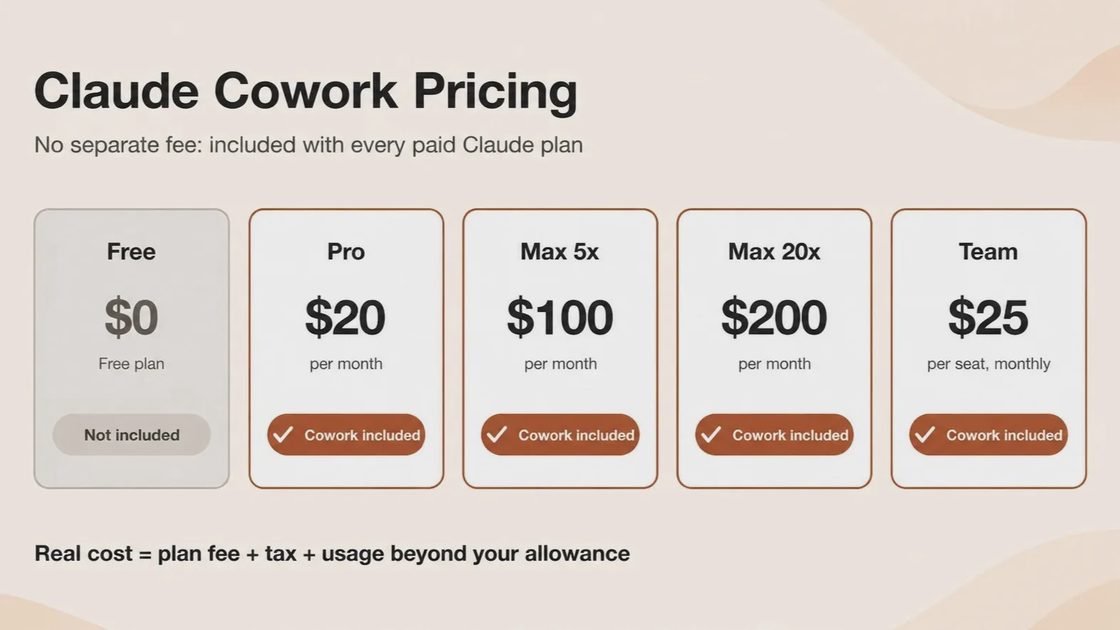
The table below shows every current tier and what it actually buys you for Cowork. Prices and multipliers are taken from Anthropic’s pricing documentation.
Plan | Price | Cowork included? | Usage vs Pro | Best for | Where it breaks |
|---|---|---|---|---|---|
Free | $0 | No | None | Chat and light file work | Cowork is blocked entirely |
Pro | $20/mo or $17 annual ($200 up front) | Yes | 1x | Occasional autonomous tasks | Daily heavy Cowork use |
Max 5x | $100/mo | Yes | ~5x | Regular multi-hour sessions | All-day Opus-heavy research |
Max 20x | $200/mo | Yes | ~20x | Parallel jobs and continuous use | Cost if you never hit the higher ceiling |
Team Standard | $25/mo or $20 annual | Yes | 1.25x | Small teams needing shared billing | Heavy individual users |
Team Premium | $125/mo or $100 annual | Yes | 6.25x | Cowork-heavy team members | Organizations past 150 seats |
Enterprise | $20/seat + API usage (20-seat minimum) | Yes | Usage-based | Regulated orgs needing controls | Teams that only need seats |
The table shows that every paid plan runs the same Cowork. The only variable that climbs with price is how far the shared pool stretches.
How the billing actually works
Cowork is a capability inside paid Claude plans, not a separate line item. There is no add-on SKU and no usage pack sold behind a paywall. You choose a plan on Claude’s pricing page; Cowork arrives with it.
Chat, Claude Code, and Cowork all draw from the same allowance. Anthropic describes the limits as a rolling five-hour window plus a weekly cap and publishes multipliers relative to Pro rather than absolute token counts. Any claim of a fixed token budget for a plan is invented.
Cowork drains the pool faster because Anthropic’s Enterprise consumption guide labels its token intensity “High.” A multi-step task executes code, creates intermediate files, calls tools, and generates output the user never sees. In practice a single Cowork session can consume five to twenty times the allocation of an ordinary chat message. The plan you pick is not buying features; it is buying runway.
The plans, one by one
Pro ($20 monthly or $17 annual)
Pro is the only on-ramp. Free excludes Cowork completely, so this is where every individual starts. It is comfortable for a few autonomous tasks a week—folder cleanups, short research briefs, or a single spreadsheet reconciliation.
Best when Cowork is a helper rather than the main workspace.
Breaks when sessions become daily and the five-hour window starts cutting work short.
The annual option locks in $200 up front and lowers the monthly rate to roughly $17.
Max 5x ($100)
Max 5x multiplies Pro’s per-session capacity by roughly five. It is the correct next step for anyone who hits Pro’s wall more than once a week and needs uninterrupted multi-hour runs.
Best for people who treat Cowork as a regular working surface.
Breaks if the workload is continuous Opus-heavy research that still exhausts the higher ceiling.
You are paying for headroom, not a smarter agent.
Max 20x ($200)
Max 20x multiplies Pro’s capacity by roughly twenty and raises output limits. It is built for operators who keep several Cowork jobs alive in parallel and refuse to wait for a reset.
Best when the five-hour window is the actual constraint.
Breaks only if cost becomes the larger problem than capacity.
Earlier access to new features is secondary to the raw runway.
Team (Standard $25/$20, Premium $125/$100)
Team is the moment a second person needs Cowork and someone must decide what the agent can touch. Standard seats deliver 1.25 times Pro’s capacity; Premium seats deliver 6.25 times and are the tier most Cowork-heavy teams actually land on. Seats range from 2 to 150.
Best when central billing, SSO, and connector controls matter.
Breaks for organizations that need audit logs, SCIM, or custom retention.
Premium seats exist because Standard is still too tight for daily heavy users.
Enterprise ($20 per seat plus usage)
Enterprise is not a bigger Max. It is a different product. The $20 seat fee buys role-based access, SCIM provisioning, audit logs, a Compliance API, custom retention, and IP allowlisting. Usage bills at API rates on top of the seat. The self-serve minimum is 20 seats.
Best for regulated industries or any team that must govern the agent rather than merely use it.
Breaks if the organization only needs seats and shared billing.
Capacity is secondary to the control surface.
The hidden costs the pricing page does not list
The weekly reset is not monthly. Burn through the allowance by Wednesday and the only free option is waiting for the window to roll.
Model choice changes the burn rate. Opus consumes capacity faster than Sonnet; defaulting to Sonnet for routine Cowork work is the cheapest control available.
Usage credits are not free overflow. They bill at API rates and carry a $2,000 per day cap. Enabling them is an active decision.
The programmatic boundary announced for June 15, 2026 was paused before it took effect. CLI and Agent SDK usage still draw from the subscription pool, but Anthropic has reserved the right to revive a revised split. Cost models that assume the current boundary is permanent are fragile.
Simone’s week: Pro vs. Max 5x
Simone tracked one real week of Cowork work—document assembly from mixed sources, a research brief, a messy folder cleanup, and one spreadsheet reconciliation—first on Pro, then on Max 5x. This is a single tracked week, not a benchmark. The task mix matters more than the plan tier.
On Pro the research brief and the spreadsheet reconciliation both hit the five-hour window. She had to stop twice, wait for the reset, and once downgrade the model mid-task to finish. On Max 5x every task completed without interruption and without a model downgrade. The difference was pure runway.
Task | Pro outcome | Max 5x outcome | What the difference cost |
|---|---|---|---|
Document assembly | Completed | Completed | Nothing material |
Research brief | Hit wall; waited ~3 hours | Completed without pause | Lost afternoon on Pro |
Folder cleanup | Completed after one short pause | Completed | Minor friction only |
Spreadsheet reconciliation | Forced model downgrade then wait | Completed at preferred model | Quality and time both affected |
The table shows that the upgrade paid for itself in uninterrupted completion, not in smarter output.
Pricing shapes, not stickers
Three distinct buying motions exist.
Subscription gives a predictable floor and a shared pool. It is the right shape for interactive work at a desk.
Usage credits on top keep a session alive past the cap. They bill at API rates and stop at $2,000 per day. They are a safety valve, not a plan.
Pure API billing is the correct shape for automated or programmatic workloads. It is the wrong shape for a person sitting in the desktop app directing Cowork by hand.
The cheapest plan is not the cheapest month, because the meter decides how you behave.
Which plan you actually need
Your situation | Start with | Why | Check before you commit |
|---|---|---|---|
Occasional autonomous tasks | Pro | Lowest entry, full Cowork | Track one week of real sessions |
Daily multi-hour use | Max 5x | Five times the runway | Confirm you actually hit Pro limits |
Parallel jobs all day | Max 20x | Twenty times the runway | Measure whether cost exceeds value |
Small team needing shared billing | Team Standard | Admin controls + 1.25x | Identify who needs Premium seats |
Cowork-heavy team members | Team Premium | 6.25x capacity per seat | Stay inside the 150-seat cap |
Regulated or audit-heavy org | Enterprise | Governance surface | Confirm the 20-seat minimum is acceptable |
Stay on Pro if…
You run Cowork a few times a week and never hit the wall.
The annual $200 commitment feels safer than monthly.
You are still learning which tasks are worth the agent’s time.
Move to Max if…
You stop mid-session more than once a week.
Waiting for the five-hour window is more expensive than the upgrade.
You need uninterrupted Opus-level research or parallel jobs.
Go Team if…
A second person needs Cowork and someone must manage access.
Central billing and connector controls are required.
Some seats need Premium capacity while others stay Standard.
What no plan solves
No plan makes a poorly structured folder safe to hand to an agent.
No plan replaces a backup before irreversible file operations.
No plan turns a vague instruction into a well-scoped task.
No plan removes the need to read what Cowork produced before it reaches a client.
No plan makes usage limits disappear; it only moves the point at which they appear.
Final Thoughts
Cowork is the same agent on every paid plan. The only real variable is how long it can run before the shared pool forces a pause. Start on Pro, measure a real week of your own tasks, and climb only when the wall becomes more expensive than the next tier. Before you commit, ask three questions: What can Cowork actually finish in this situation? What happens when the allowance runs out? What should a human still review before the result is trusted?
FAQ
Is Claude Cowork free?
No. Free excludes Cowork completely. The lowest tier that includes it is Pro at $20 per month or roughly $17 when billed annually.
How much does Claude Cowork cost by itself?
Nothing. It is bundled into every paid Claude plan. You choose the plan; Cowork arrives with it.
What is the real difference between Pro and Max?
Capacity only. Both run the identical Cowork and the same models. Max 5x multiplies Pro’s usage by roughly five; Max 20x multiplies it by roughly twenty. You upgrade to stop hitting limits, not to get a better agent.
Do I need Max to use Cowork at all?
No. Pro includes the full Cowork feature. Max exists solely for people who exhaust Pro’s shared pool.
How does Team pricing work for heavy Cowork users?
Standard seats give 1.25 times Pro’s capacity. Premium seats give 6.25 times and are the practical choice for anyone running Cowork as a primary workspace. Seats range from 2 to 150.
What happens when I hit the limit?
You can wait for the rolling five-hour or weekly reset, move to a higher plan, or enable usage credits that bill at API rates with a $2,000 daily cap. Enabling credits is an active choice, not a default.
For AI tool features, usage rules and available plans, refer to their official sites.
Leave your thoughts here, too.